School counselors are pulled in a million directions. Okay maybe not a million, but it certainly seems as though we could easily be drawn and quartered with the demands on our time. We need to find ways in which to reduce time spent managing our counseling programs and materials so we have more time to spend with our kiddos. Enter
Goodreads!

For those of you that may not have had the pleasure of discovering
Goodreads until now, it is somewhat of a Facebook (without the games & pokes) for book lovers. I have used
Goodreads now for several years to keep track of my personal book collection and to connect with other like-minded readers.
After reading
Entirely Elementary Counseling's Dr. Susan Fuller's Facebook post about cataloging her books on Library Thing, I found a new batch of motivation to reorganize my professional book stash. I have been using a clunky excel spreadsheet, but it hasn't really been an effective way to get my books into the hands of my teachers.
Okay, now enter
Goodreads (along with the help of my iPad). The whole process is fairly simple and took me less than an hour to catalog over 100 books.
Steps:
1. Open a
Goodreads account.
2. Download the Goodreads app onto your iPad or smartphone.
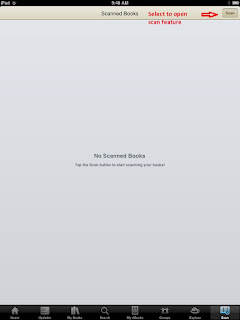
3. Scan the bar code on each of your books by selecting the scan feature and lining up the book's bar code in display window . (This goes quickly if you stack your books first, bar code side up. Stacking your books also helps identify which books you have already scanned. This may not be such an issue if you are only scanning a few books).
4. You will know when your book has been scanned when you see the ISBN pop up on the screen of your iPad or smartphone.
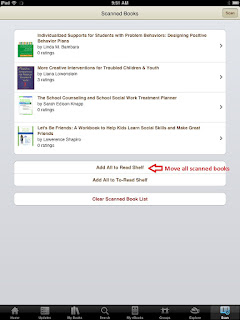
5. After you scan a book (or several) you need to select "add to shelf".
The app falls a bit short, in that you can only upload your books into either your "read" shelf or your "to-read" shelf. To bypass this short coming, you can open Goodreads on your computer and "batch edit" the scanned books and tag them onto their appropriate shelves.
I still have about 20 books that didn't get along with my scanner. Most of them were purchased from specialty stores (like
The Self-Esteem Shop) or conferences. I will need to go in and type the names in individually, but I would much rather type in 20 than 120!
Please let me know if you have any questions. I would love to hear from you!
~Heather



.PNG)


![Friends: Making Them & Keeping Them [With 5 Mini Friendship Posters]](https://lh3.googleusercontent.com/blogger_img_proxy/AEn0k_ss3A114MWAEbBAoJMjaMo5F6lU-1gqaSuTRbU-gXhH-XaDb90uFjdw_4E1LtVBGKhSfPq-sOgYRrT5G9jlzxClX-A1zuXglP7XCnt02xi3_C4a654kaGEb3g=s0-d)


